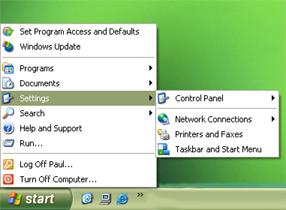
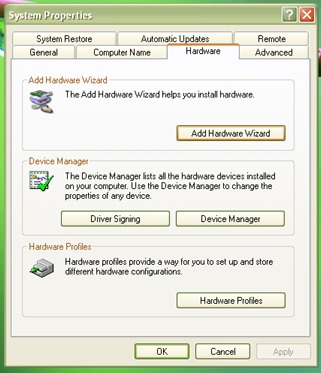
If something starts to go wrong or gives a fault symptom. We can look at the hardware on the PC in order to see if there are faults. We do this by looking at a list of hardware components. This can be found in the control panel. To get there we need to :-
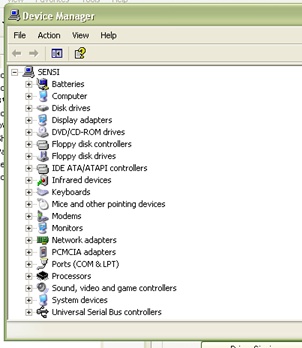
| 1. click on start button 2. click on settings 3. click on control panel 4. click on system 5. click on hardware 6. then click device manager |
 |
 |
 |
This set of instructions might vary slightly depending on which version of windows you are using but it will be very similar and you should be able to follow your way through it.
When we get a list of devices it is possible to look down the list at various categories. You will see words such as audio video devices. There will be a + sign beside the words. If you click on the words with the plus sign you will expand the category and you will see a list of installed devices. Such as the video card etc. if a device has a problem there will be a small exclamation mark beside it showing there is a conflict. It is at this stage that we can double click on the device with a problem and follow options to re-install the drivers or to search the internet for newer drivers.
We also use the control panel for such operations as adding and removing hardware. One option if we find an item with a conflict is to remove the item by deleting it. After which windows should be shut down in the usual way. When the computer is re-started windows should find the device and start to load the correct drivers for it. If the device needs drivers which windows doesn't have you will be asked for the set-up disc. Then it is just a case of following the instructions.