The best way to combat computer problems is to try and prevent them happening in the first place. The problem with the mouse moving erratically can be avoided in two ways.
1. Always use the mouse on a mouse mat and avoid all the dirt of fluff
2. Clean the mouse rollers once every month or so and make sure you keep the mouse mat clean and dry.
Files can be partially protected from corruption by making sure the computer is always shut down properly. If you have to do a soft boot by using "ctrl + alt + delete" several times avoid damaging files further by simply waiting a few seconds extra before switching the power back on. This allows the hard drive to physically stop properly before power is restored. This sounds very simple but it can save files.
Make sure the computer isn't in the way. By this I mean make sure it doesn't get knocked about or pulled forward. This avoids cables being pulled out of sockets.
In storms un-plug the modem cable from the wall socket. If lightning strikes a phone line a voltage surge can damage the modem. Also try to un-plug the power cables so there is no chance of power surges hitting the computer and blowing main boards.
And then we come on to every ones main worry. Virus attacks. If you use the internet then you are open to virus attacks. There are various types of attacks which occur. Three of these are - Virus, Trojans and worms. Each of these can use your computer to damage or delete files etc. some use your email programme to send the virus to your friends without you knowing and others can send information to the people responsible for the attack by sending information when you connect to the internet.
Major virus attacks can destroy your computer completely. BUT there isn't a need for this to happen. Anti virus software comes in all shapes and sizes and there are many free programmes which are very good and available on line. Having said that, simply installing anti virus software on your machine is not enough to protect you from a virus. Each week hundreds of new virus are released onto the internet. We only hear about the major ones which affect industry and make the news, or we are unlucky enough to actually get infected ourselves. Hopefully you will all have some sort of anti virus software running on your computer, but how many of you make sure you update the software on a regular basis? So once you install anti virus software you must make sure you find out how to update the programme on a regular basis. You'll be glad to know this doesn't mean you have to buy new software each week. All that needs to be done is to connect to the internet and allow the anti virus software to connect to its website and retrieve the latest database of virus information. If you do this say once a week it will take a few minutes if that. And you will have the best protection. If you leave it a few months it could take half an hour or even more. In the meantime you would be open to attacks.
Most anti virus software will also check your incoming and outgoing email. This in turn protects your computer and your friends computers from receiving a virus through your email programme.
Another safety precaution to take and it is very simple but effective. Is simply be aware of the possibility of a virus attack through email. Remember where email is concerned "if in doubt, throw it out" by this I mean. If you get an email you are unsure of. Even if it comes from a friend. If there is an attachment which and you don't know what it is, then delete it. next time you speak to your friend ask them what they had sent to you via email. They might say something like "oh it was a joke from work or a picture I was sent" or they might say "what email?" if the email was ok and the attachment was harmless they can always send it again. Be aware that many viruses are spread rapidly by the fact that person gets joke email or attachment and immediately sends it to all his or her contacts in the email programme. So don't open an attachment unless it is something you are expecting or something you are sure is ok.
This sounds harsh. but a virus can infect your machine through email and it can spread by itself by simply attaching itself to email to all your contacts. They don't even need you to write the email.
I had this very thing just a few months ago. My friend said his laptop was running slowly and kept trying to dial his internet connection without him doing anything. When I looked into it I found three separate virus. Well actually one virus which simply renamed some files and moved one or two things. A Trojan which was responsible for trying to connect to the internet. What was happening was that after a certain amount of time the Trojan would try to dial the internet connection and if it was successful it would proceed to send a file containing all my friends internet activity to who ever was responsible for the virus. My friend was lucky in a way as he had set up his connection so he had to physically press a button in order to dial the internet. This was very good as it stopped the Trojan from just dialling out when it wanted. Each time it tried to dial out a box appeared so my friend would have to click connect.
Some people set the connection to connect automatically. For example you click the internet browser button it appears and straight away it dials up for you. Ok that's convenient but think of this, you go out to the garden or kitchen for a few moments leaving your computer running, maybe your typing a letter for example. When you are out of the room the Trojan sees its time to dial in. it starts to try and access the internet and finds your computer accepts its request and dials in automatically. You know nothing about it as you aren't even at your computer.
So hopefully you will start to think more about settings and precautions. Clicking a button to actually make the connection might mean another click for you but it could stop a virus or Trojan just using your phone when it likes.
But its not just anti virus software which needs to be kept up to date. How many of you have seen the "windows update" listed on the start bar?
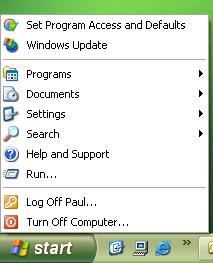
How many of you actually keep it up to date? These updates are also very important as they patch security holes in Microsoft's programmes. They also fix common problems with windows such as driver updates (remember how important they are).